Showing posts with label Flickr. Show all posts

Wednesday, January 28, 2009

Cartoonize Your Photo at BeFunky

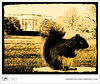
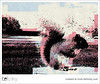
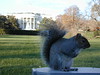
I checked out a cool image generator site after getting a "tweet" from someone I follow on Twitter. Check out BeFunky. It allows you to cartoonize, along with many other ways to customize, your photos. Here is an example of one photo, many ways...

My original Photo (George the Squirrel)

George (Scribbler effect)

George (Sunburst effect)

George (Stenciler effect)

George (Patriotic effect)

George (Charcola effect)

George (Cartoonize effect)

These are just examples of what can be done on this site, there are many, many more options. I was thinking you could create your very own avatar, using an actual photo of yourself. I may have to try that.

Sunday, January 25, 2009

If You're Gonna Play In Fargo. . .

Quincy Loves Snow!
My friend Sue e-mailed me this song and I couldn't resist forwarding it up to our daughter who attends Concordia College in Moorhead, Minnesota (Fargo's twin city). I hope you smile when you listen to it!

If You’re Gonna Play In Fargo. . .

Posted using ShareThis

Wednesday, December 17, 2008

Barak Obama and Twitter

I have finally figured out a use for Twitter. I think I "get it" now!

At the TIES 2008 conference, I attended a class on using Twitter in the classroom. Through that class, I learned how to search for people with similar interests. After signing up for a Twitter account, you can go to http://search.twitter.com and type in something that you are interested in, i.e.: Web 2.0, quilting, goecaching, etc. A list of people who Twitter about that subject will come up. You can then click on their picture, look at their "tweets" and if you are interested in what they have to say, you click on the "Follow" button below their profile picture. I added the Twitter gadget to my iGoogle homepage so that I can have easy access to the "tweets" of the people I'm following.

I was pleasantly surprised when I checked my e-mail yesterday to discover that Barak Obama has chosen to follow me on Twitter! I forwarded the e-mail to impress my friends and family!

Friday, October 17, 2008

My photo was published by Schmap!! New Orleans


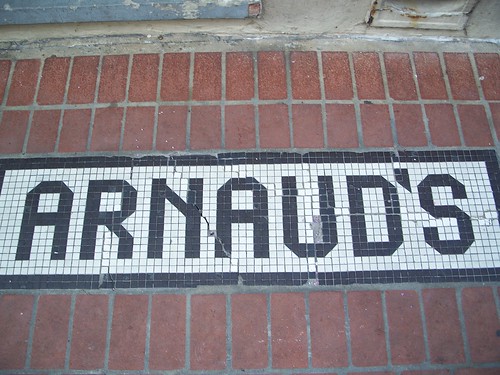
I was notified today that one of my photos was selected to be in the current edition of Schmap!! New Orleans. I had placed my vacation photos from New Orleans, Louisiana on Flickr this summer. The photo editors of this publication saw my New Orleans photos on Flickr and asked me to let them consider my photo of the sidewalk sign at the restaurant Arnaud's for inclusion in their new edition. They decided to use it! I placed a Schmap!: New Orleans widget on my blog sidebar. There are several photos for each restaurant, so to find mine, go to Arnaud's and then look for the sidewalk sign! Who would have guessed this small-town girl from Minnesota would help to promote New Orleans!

Thursday, October 2, 2008

Even More Fun with Picnik!


Picnik has just added a photo collage feature and also, as of today, some very spooky and fun Halloween fonts!

Tuesday, September 30, 2008

Fun with Picnik!


Nature Poster
Originally uploaded by SZSRocks

I (almost) forgot how fun it is to play around with Picnik. This week we had some students who needed to add words on top of a picture. You can easily do this in Picnik. I know there are other ways to add wording to pictures, but Picnik is easy and fun to use.

I am a member of the Picniker's group in Flickr. If you go to this group on Flickr, you will be amazed at how you can edit your photographs.

I also discovered today that you can download a Picnik "add-on" to Firefox which allows you to right click and send a screenshot to Picnik. This could be a really useful tool when creating "how-to" instructions. To download this "add-on" to any browser, go to the Help menu on the Picnik homepage. Then click on Tools and it will walk you through the process. I also subscribed to the Picnik blog in my RSS feed so I can keep up with new features. This can also be done through the Help menu and then the Blog link.

I created the picture in this post by uploading one of my photos to Picnik. I then added a shape and the text. I then saved it to my Flickr account and then posted it into my blog.

Monday, April 21, 2008

Happy Monday!

I found this photo by Shaka & Nosbe' (PPA Crew) on Flickr and thought it was awesome. I hope you like it. Happy Monday!

Wednesday, April 16, 2008

Exploring Splashr

I went back to explore Splashr a little more (More Fun with Flickr, Thing 5) and created this photo montage of Flickr photos with the tag coffee. I think this is a pretty neat feature. We could use photos of our library, school and school activities on our web-site. Just a thought!
My Presentation

Friday, April 11, 2008

Sacred Beauty


sacred beauty
Originally uploaded by tinybirdie18
My niece took this very cool photo. It reminds me of a crystal ball. Maybe it's the Minnesota version and we should consult it on when Spring will actually arrive here. Hopefully before July 4th, but I'm not placing any bets, considering our never ending Winter this year!

Sunday, April 6, 2008

Weekend Adventures

Friday was a "No School" day for me and so I decided to take a road-trip to Fargo, North Dakota to visit my daughter. Before leaving Elk River, I came across two more of my favorite signs of
Spring.

First, a pickup truck pulling a boat rather than snowmobiles, and second, my first garage sale sign of the year! Didn't have time to stop...major bummer! :(

After arriving in Fargo, I picked up my daughter and her friend, and we drove to Grand Forks to hear presidential hopefuls Barak Obama and Hillary Rodham Clinton speak at the North Dakota DFL convention. We waited in line close to 2 hours (outside, in the brisk Canadian breeze) and weren't sure if we were actually going to get in to hear the speakers or not. The stadium holds 21,000 people and they were coming close to being filled to capacity. Here we are waiting in line.


We did get in and got to hear both Sen. Obama and Sen. Clinton's speeches. Both got rousing applause and cheers for proposing to abolish "No Child Left Behind", making college more affordable, making health insurance more affordable and available to all, raising teacher's salaries and withdrawing from Iraq. I know they were "preaching to the choir" at this event, but it was fun to see the enthusiasm. Here are a couple of pictures from the event.


The first picture is of Senator Obama on the Jumbotron during his speech and the second is Senator Clinton giving her speech (she is in the middle wearing a red jacket).

By the way, I had to look at an atlas to see how close we were to Canada. It was indeed colder in Grand Forks, but also the hotel attached to the Alerus Center was the Canada Inn. Does anyone else find this a little strange? They had both the US and Canadian flags flying (at the same height). According to the map, Grand Forks is about half way between Fargo and Canada.


I left the great Northland on Saturday, after having a great time with my daughter. On the way home, a wild turkey flew in front of my van on Interstate 94. It's always a thrill to see one of these huge birds, but a little scary when you come close to colliding with one!

Well, it's Sunday now and I need to keep working on "23 Things". This post was the first time I selected "None" for my layout options. I wanted to play around with the placement of the imported photos. I think it worked okay.
Sunday, March 30, 2008

Wednesday, February 27, 2008

Thing 4 - ERHS New Books


ERHS New Books
Originally uploaded by SZSRocks
I'm still learning new things from Flickr. On this photo, I have added information that pops up when you move your cursor over the book. I think you need to click on the picture in my blog and be transferred to Flickr for this to work. I wanted to add a link to our on-line library catalog in the pop-up information, but I haven't figured that out yet. I'll keep trying!

Tuesday, February 26, 2008

Thing 6 - Image Generators and Conclusion

Playing around with Flickr and the related other programs was very fun (mostly). You can easily let your imagination take over and be really creative. Making posters, promoting books and authors, adding images to blogs and/or web pages and using these photos/graphics to enhance power points, word documents, etc. would be good uses in a library setting. Just knowing that these tools are out there and are available for use will come in handy. On to Thing 7!

Thing 5 - Flickr Mashups

I was really excited about the "Spell with Flickr" mashup. However, last night proved to be beyond frustrating! If I got the word into the blog message, it duplicated, and even though I had selected the "small" image, more than four letters were too big to be displayed properly and I couldn't figure out how to resize the image to fit better. I had success when I added the words at the bottom of my blog as a page element, but I really wanted to use them in a post. I haven't figured out a way to save the word image and then be able to size it and use it anywhere else other than a page element. I worked way too long on this last night and it was very frustrating. The other mashups are cool, but I'm not sure how I would use them, and again, after being predominately unsuccessful in the Spell mashup, I'm not too keen on trying any of the others. Bummer!

Monday, February 25, 2008

Thing 6 - Motivational Posters


When I got home from school today, my daughter had given our cat a bath. This is the same cat that I have on the trading card in a previous post. As you can see, he is not a happy cat! The photo op was too good to pass up. I then tried something new at Big Huge Labs (motivator creator). You could use this to do personalized motivational posters or even author highlights or quotes. Just a thought.

Thing 6 - Puzzle


I'm not quite sure how this next application I found on Big Huge Labs website would benefit our library, but it was so cool I had to include it in my blog! This is a puzzle picture. I imported a picture from my Flickr account to Big Huge Labs, and created the puzzle. I then saved it to my desktop and imported it into this post.